Introduction
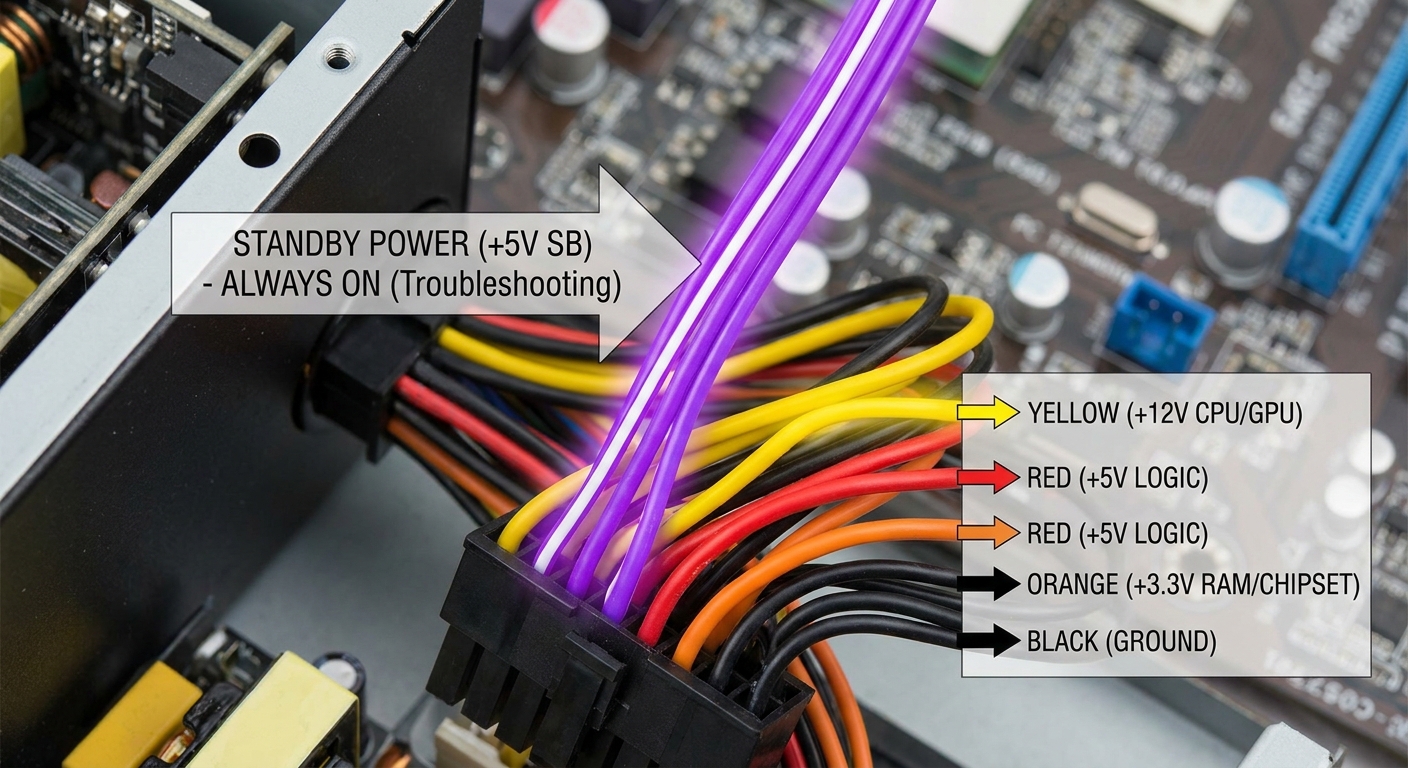
In the realm of personal computing, encountering a no-power issue can be one of the most frustrating experiences for users. This article aims to tackle the specific question: what role does the purple wire in power supply units (PSUs) play in fixing these problems? Understanding the functionality of the purple wire, which corresponds to the standby power (5VSB), is crucial for diagnosing and resolving power issues without needing extensive technical knowledge.
This topic matters greatly as improper handling of power supplies can lead to unnecessary replacements or even hardware damage. A common misconception is that the PSU is entirely dead when a PC fails to power on. However, a functioning purple wire can indicate that your PSU still possesses some usability. In this article, you’ll learn how to diagnose no-power symptoms, understand the significance of the purple wire, and how to safely utilize it in your troubleshooting efforts.
Understanding Power Supply Units and the Purple Wire
To effectively troubleshoot no-power issues, it’s essential to understand how power supplies work, particularly regarding their wiring. An ATX power supply unit has a standard pinout, which includes a variety of colored wires that carry different voltages to power computer components. Among these:
- Yellow: +12V
- Red: +5V
- Orange: +3.3V
- Black: Ground
- Purple: +5V SB (standby voltage)
- Green: /PS_ON (Power On signal)
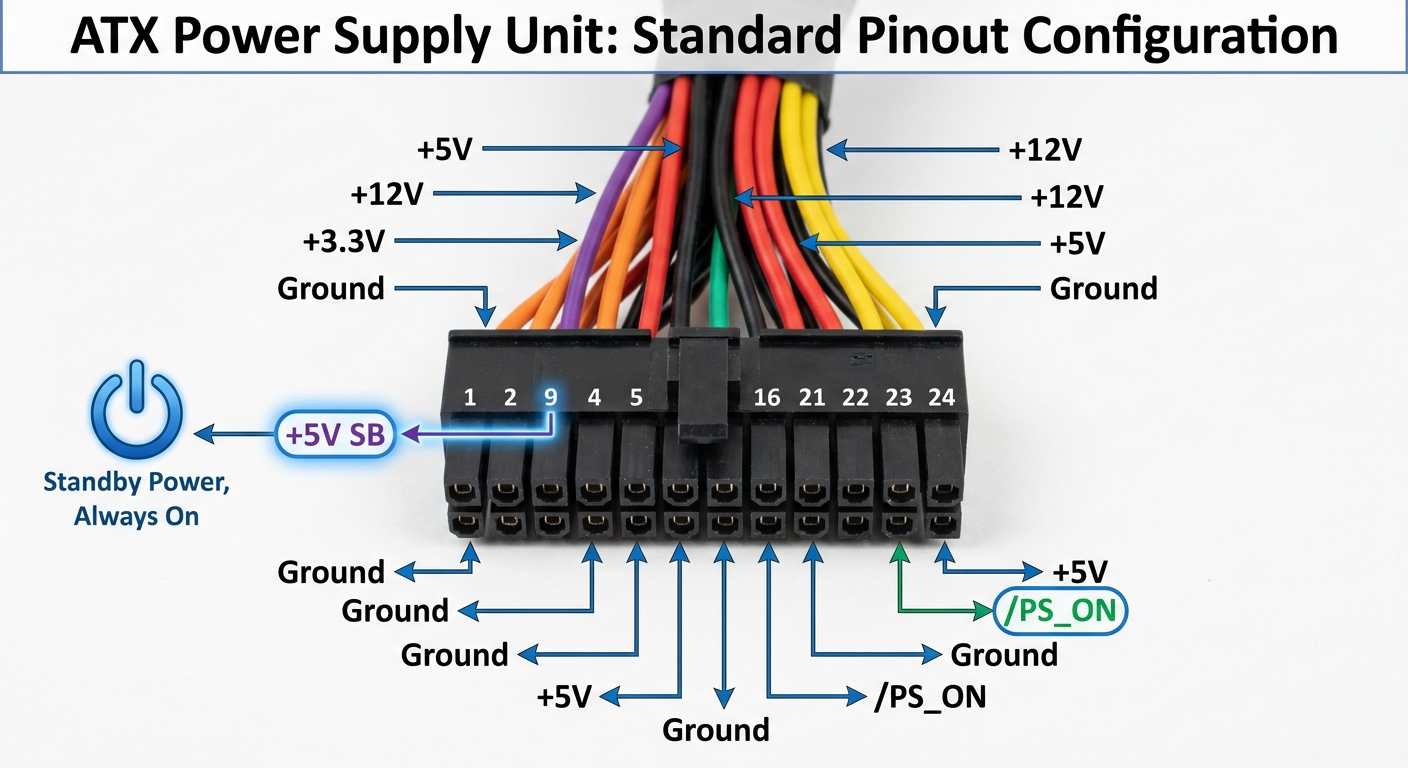
The purple wire consistently outputs a +5V standby voltage, which is expected to be present even when the computer is turned off. This voltage is crucial as it powers devices like USB ports that can be active when the PC is in sleep or off states, allowing for charging and peripheral functionality.
You may also like




Diagnosing No-Power Issues
Step-by-Step Troubleshooting Process
Before jumping to conclusions about a dead power supply, follow these diagnostic steps to assess the situation:
- Check Power Connections: Ensure that the PSU is properly connected to both the wall outlet and the PC. Look for damaged cables or loose connections.
- Test the Power Button: Try using the reset button instead of the power button to eliminate button failure.
- Measure Voltage on the Purple Wire: Using a multimeter, measure the output voltage of the purple wire. It should read approximately +5V. This indicates that the standby functionality is operational.
- Isolate Components: Disconnect all peripherals and non-essential components. Try to power on the system with minimal hardware to rule out faulty devices.
- Inspect the PSU Fan: Listen for the PSU fan when attempting to power on the PC. If there’s no movement or sound, the PSU may be faulty.
These steps allow you to determine whether the PSU is functioning, focusing particularly on the purple wire’s status as a key indicator of usability.
Understanding Standby Power and Its Importance
The 5V standby power provided by the purple wire is crucial for several reasons:
- It allows certain components, such as the motherboard and USB ports, to remain powered when the PC is turned off. This feature supports the quick start of the system and maintains connectivity for charged devices.
- In the absence of +5VSB, users may experience difficulties such as non-responsive USB ports or failure to send a signal to the monitor, leading to confusion during troubleshooting.
Understanding this helps dispel the myth that a dead PSU means absolute failure. A functioning purple wire indicates that at least part of the PSU is operational, presenting options for continued use or partial functionality for fans and LEDs.
Using the Purple Wire Safely
Powering Components with the 5VSB
Users often wonder if they can utilize the purple wire for powering fans or other small devices. While it’s technically feasible to draw power from the +5VSB line, it’s important to keep a few considerations in mind:
- The load on the purple wire should be minimal, ensuring it doesn’t exceed its maximum rating.
- Connecting low-power components like small fans is acceptable and can serve as a temporary solution.
- Exercise caution, as prolonged or excessive use can lead to circuit damage or burnout of the PSU.
Maintaining awareness of these guidelines will help in troubleshooting and understanding the limitations of the standby power provided by the PSU.
Challenges and Common Misconceptions
It is essential to take note of challenges that may arise during the troubleshooting process:
- Misinterpretation of wire functions: Some sources may mislabel or incorrectly identify wire colors, leading to confusion. Always refer to reliable pinout documentation.
- Believing the PSU is entirely dead when the purple wire is functional can mislead users into replacing the PSU unnecessarily.
In some cases, users may encounter discrepancies in manufacturer specifications, particularly with brands like Dell. While ATX power supplies standardize many aspects, variations can exist. It’s critical always to verify information against credible sources.
Conclusion
Understanding the role of the purple wire in your PC’s power supply is crucial for troubleshooting no-power issues. This wire signifies the presence of standby power, allowing for USB functionality even when the main power is off. By measuring voltage, diagnosing component connections, and safely utilizing the purple wire, you can effectively navigate through power-related problems. For anyone facing a similar situation, knowing about standby power can illuminate the path toward a solution.
For further guidance, consider exploring related topics such as PSU compatibility or the function of other colored wires in ATX power supply pinouts.
Rotating USB