Understanding the RJ45 Connector and Its Pinout Color Codes
The RJ45 connector is a cornerstone of modern networking, widely used in Ethernet cables that connect computers, routers, and switches. This article aims to clarify the intricacies of RJ45 pinouts and color coding, specifically focusing on the two primary wiring standards: T568A and T568B. Understanding these color codes is vital for anyone involved in network setup, as incorrect wiring can lead to connectivity issues. One common misconception is that both wiring standards are interchangeable; however, using the wrong standard can cause malfunction in network communication. By the end of this article, you’ll gain a comprehensive understanding of RJ45 wiring standards, their specific color codes, and how to wire them correctly.
How RJ45 Connectors Work
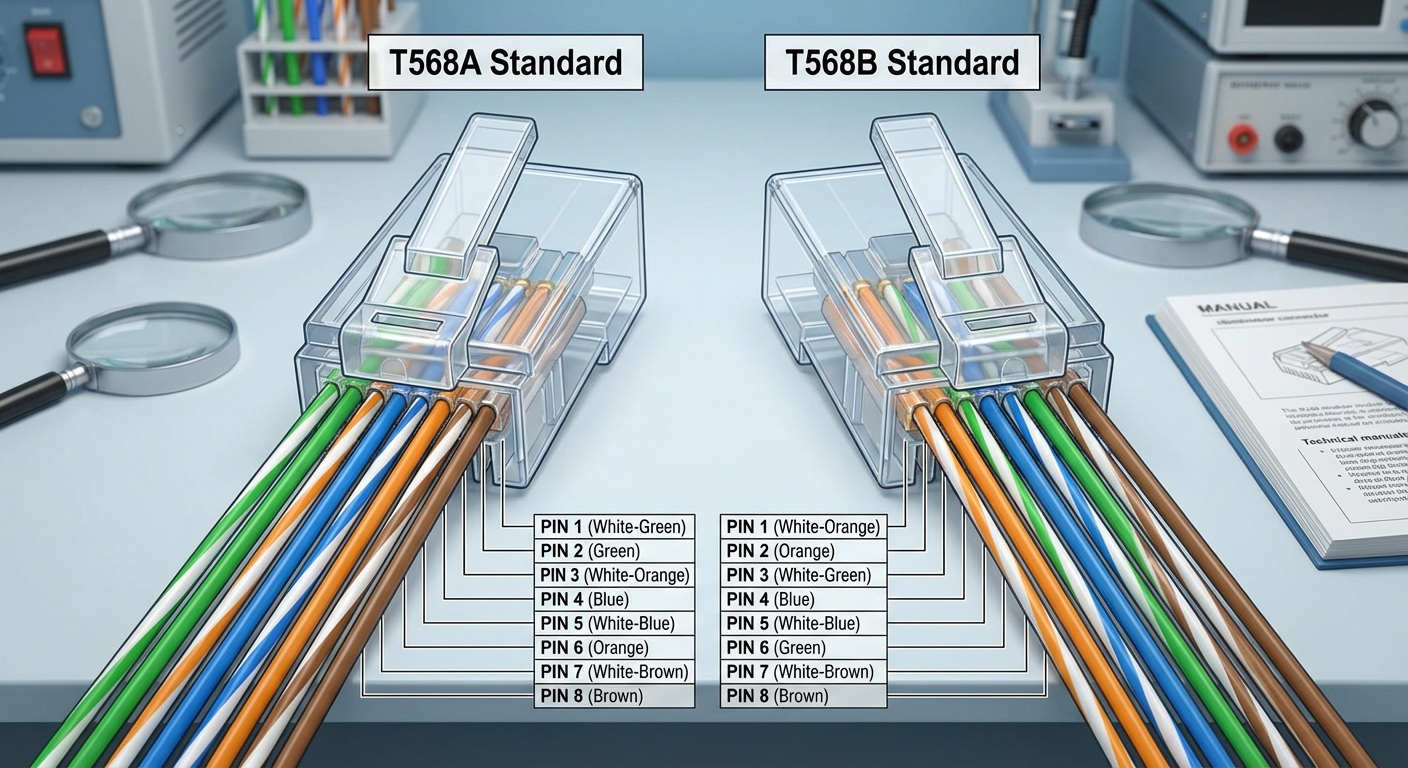
The RJ45 connector is designed to terminate Ethernet cables, facilitating data transfer between devices. Each connector houses eight pins, which correspond to different wires within the cable. The standard Ethernet cable consists of four twisted pairs of wires, where each pair is color-coded to ensure correct wiring. The two main standards, T568A and T568B, define which colors correspond to which pins, impacting how devices communicate over the network.
RJ45 Color Coding Standards
T568A Standard
The T568A standard is often favored in new installations, particularly in residential networks. Below is the pinout for the T568A wiring standard:
| Pin Number | Color Code | Function |
|---|---|---|
| 1 | White-Green | Transmit + |
| 2 | Green | Transmit – |
| 3 | White-Orange | Receive + |
| 4 | Blue | N/A |
| 5 | White-Blue | N/A |
| 6 | Orange | Receive – |
| 7 | White-Brown | N/A |
| 8 | Brown | N/A |

T568B Standard
The T568B standard is the most widely used in commercial installations and is often what you’ll encounter in existing network setups. Here’s the corresponding pinout:
You may also like


| Pin Number | Color Code | Function |
|---|---|---|
| 1 | White-Orange | Transmit + |
| 2 | Orange | Transmit – |
| 3 | White-Green | Receive + |
| 4 | Blue | N/A |
| 5 | White-Blue | N/A |
| 6 | Green | Receive – |
| 7 | White-Brown | N/A |
| 8 | Brown | N/A |
Using the RJ45 Standards Correctly
When to Use T568A vs. T568B
Choosing between T568A and T568B often depends on existing infrastructure or regional preferences. Both configurations will work similarly if matched correctly at both ends of the cable.
- T568A: Preferred for residential networking and new installations.
- T568B: Common in enterprise environments and often found in older buildings.
It is crucial to maintain consistency in the pinouts used throughout your network to prevent connectivity issues.
Creating Ethernet Cables
To create custom Ethernet cables, it’s vital to follow the color codes precisely. Here’s a quick guide on how to wire an RJ45 connector:
- Strip about an inch of insulation from the end of the Ethernet cable.
- Untwist the wire pairs and arrange them according to the chosen standard (T568A or T568B).
- Trim the wires to the appropriate length, ensuring they are even.
- Insert the wires into the RJ45 connector, ensuring they reach the end.
- Use a crimping tool to secure the connector onto the cable.
- Test the cable with a cable tester to confirm its functionality.

Common Misconceptions and Troubleshooting Tips
A prevalent misconception is that any RJ45 connector will work with any Ethernet cable. The reality is that the wiring standards, pinout configurations, and even the type of cable (e.g., Cat5e, Cat6) matter significantly. Here are some troubleshooting tips if you experience connection issues:
- Check the wiring at both ends to ensure it matches the chosen standard.
- Test with a cable tester to identify any wiring faults.
- Inspect connectors for damage or poor crimping.
Frequently Asked Questions
What does RJ45 stand for?
RJ45 stands for Registered Jack 45, which is a standardized physical interface used for connecting network devices.
Can I use T568A and T568B interchangeably?
While both standards can technically connect devices, they must match at both ends of the cable. Mixing them can result in a non-functioning connection.
What types of cables use RJ45 connectors?
RJ45 connectors are primarily used with twisted pair Ethernet cables, such as Cat5, Cat5e, Cat6, and Cat6a cables.
What is a crossover cable?
A crossover cable is a type of Ethernet cable wired differently than standard cables, allowing direct connection between two similar devices, such as two computers. It typically uses T568A on one end and T568B on the other.
How can I learn to crimp RJ45 connectors?
Many online tutorials and guides are available that demonstrate how to crimp RJ45 connectors properly. Practicing with a crimping tool and spare cable can also be beneficial.
Conclusion
Understanding the pinout color codes of RJ45 connectors is pivotal for creating reliable Ethernet connections. Remember to follow either the T568A or T568B standard consistently to ensure connectivity. Exploring related topics such as different types of Ethernet cables and their applications can further enhance your networking knowledge.
Rotating USB